

Uploading Photos
More options
 Discuss with Marie
Processing Queue
See which photos AI is still processing and retry processing those that failed.
Every uploaded photo undergoes processing: previews, AI description and tags, and face detection. The processing queue shows you the progress.
Open the queue on the dashboard by clicking the Processing Queue number. If processing fails, you will also be notified via notifications.

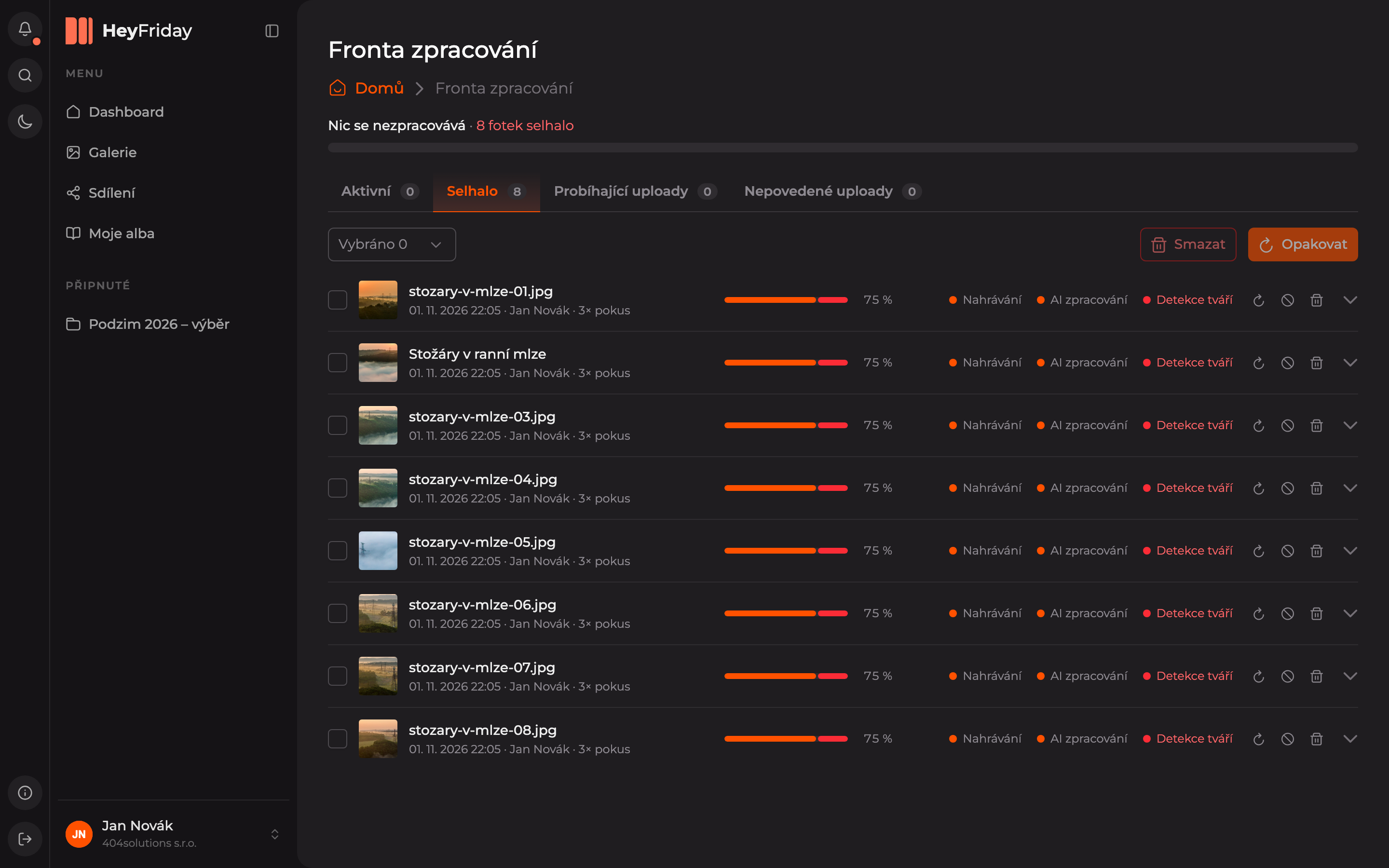
At the top is a summary, for example Nothing is processing · 8 photos failed. Below are the tabs:
| Tab | Contents |
|---|---|
| Active | Photos currently being processed. |
| Failed | Photos where some processing step failed. |
| Ongoing Uploads | Uploads that are still in progress. |
| Failed Uploads | Uploads that were interrupted. |
Retry Processing
Open the Failed tab
For each photo, you can see how many times processing was attempted, with color-coded steps: Uploading, AI Processing, and Face Detection. The step that failed is shown in red.
Restart processing
Select the photos and click Retry at the top right. You can retry a single photo by clicking the arrow icon at the end of its row.
Updated